All 8 BlogKub Blogger theme templates and how to choose the right one
Starting a site with a template that fits your kind of site saves time and gets better results. BlogKub has 8 templates designed for different kinds of site, each with blocks and features installed to match. This article introduces all 8, who they suit, what they include, and how to choose the one that fits your site.
Quick summary: BlogKub has 8 templates: Personal Blog, Travel Blog, Tech Blog, Classic + Sidebar (blog category), Magazine (news/magazine), Company (business), Online Course (education), and Product Review (affiliate). Each installs the blocks and features suited to that kind of site automatically. Every template is customizable, and supports SEO/schema and responsive design out of the box.
Why choosing the right template matters
A template is not just a "look", it is the starting point that sets what structure and features your site has. Choosing a template that matches your kind of site gives you the right elements from the start, without assembling them yourself. For example, if you build a review site, starting with the review template that has a rating bar and Pros/Cons box is faster than starting from scratch and adding each piece.
In BlogKub, choosing a template installs the blocks and features suited to that kind of site automatically. Then you customize the text, colors, fonts, and turn features on or off by dragging, with no coding. A template is therefore a "good starting point" that gets you to the site you want faster. Let us look at who each of the 8 suits.
Blog category: Personal, Travel, Tech, Classic + Sidebar
1. Personal Blog
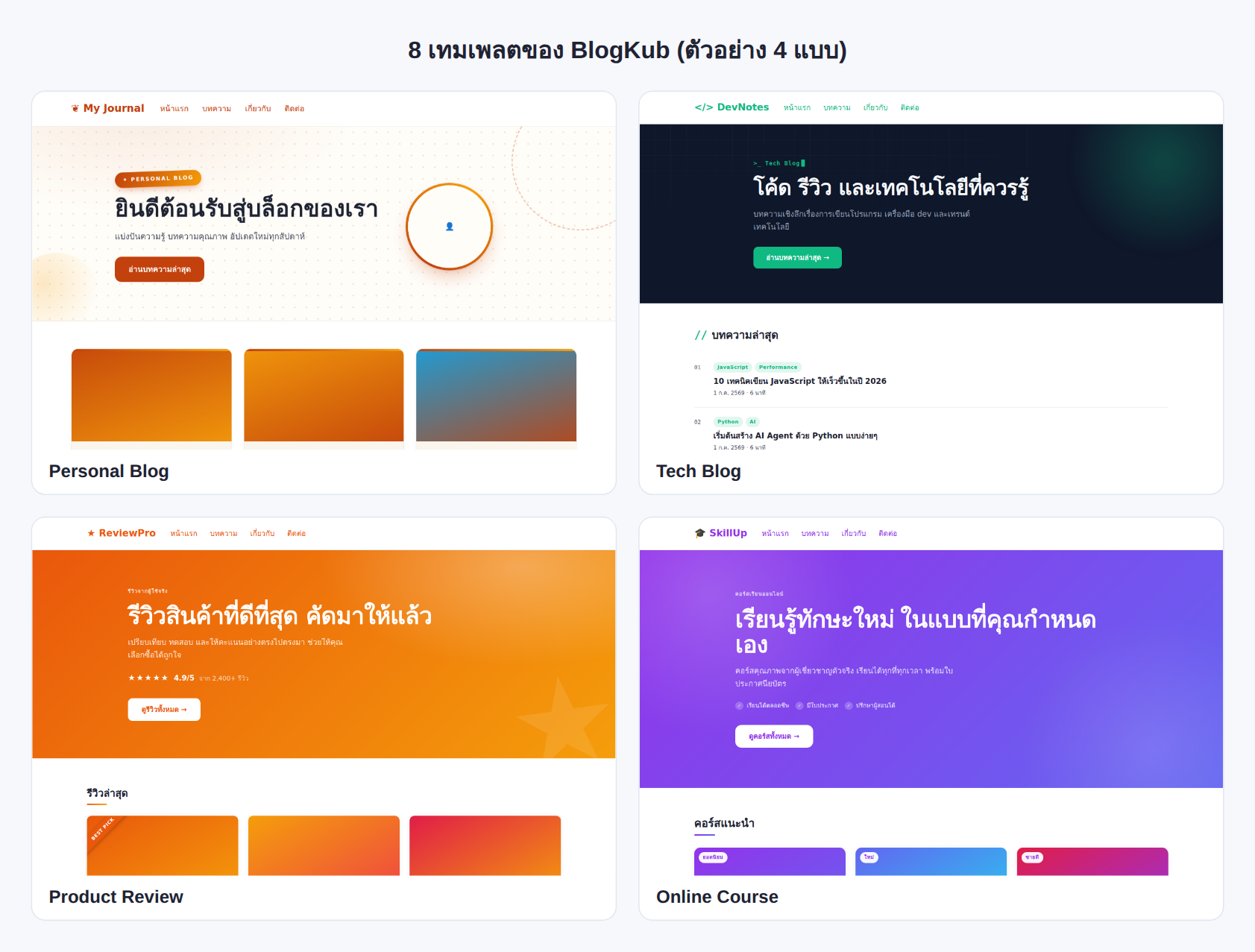
A personal blog template emphasizing warmth and approachability, good for people who want to share stories, thoughts, or general knowledge. It has a welcoming Hero with a circular profile image, and a post grid that shows content beautifully. A good starting point for general bloggers who want a good-looking site without complexity.
2. Travel Blog
A travel blog template emphasizing images and atmosphere, good for people writing place reviews, travel journals, or destination guides. The design favors showing beautiful photos, pairing well with an image slider and Lightbox, making travel articles attractive and telling stories through images fully.
3. Tech Blog
A tech blog template that looks modern and clean, good for people writing technology articles, coding tutorials, or gadget reviews. It pairs neatly with a copy code button and Callout box, suited to content with code and technical information.
4. Classic + Sidebar
A classic blog template with a sidebar beside the content, good for blogs with many articles and categories, because the sidebar aids navigation by category, search, and an archive. It is a format readers are familiar with and suits sites focused on content discovery.
News/magazine category: Magazine
5. Magazine
A magazine/news style template emphasizing professional media-style content layout. The highlight is a featured article pinned with a label, so you choose which story should be the big headline. It suits sites with varied, frequently updated content, such as news sites, article collections, or sites that want to look like serious media. Arranging a headline with secondary articles creates a hierarchy that makes the homepage interesting.
Business category: Company
6. Company
A template for a company or business site, emphasizing credibility and communicating services. It has a Hero that can include a secondary button (such as Contact us), feature columns to show service highlights, and an About block that can include stats. It suits businesses that want a professional-looking site to describe services and generate leads through a clear CTA.
Education category: Online Course
7. Online Course
A template for an online course or education site, emphasizing persuading people to enroll. It has a Hero that can include a feature list (chips) of the course, a CTA that can include student stats, and an instructor block that adds credibility. It suits people selling courses, teaching online, or building an educational site that wants to turn visitors into students.
Affiliate category: Product Review
8. Product Review
A template for product review and affiliate sites, designed to help readers decide to buy. The highlights are a Hero with a review rating bar, a Pros/Cons box and summary score to summarize the pros and cons, and an author block that can include a verification badge. It suits people building review sites to earn from affiliate, who want to present reviews credibly and lead readers toward a purchase.
How to choose and use a template
- Choose a template by kind of site. Pick 1 of 8 templates that best matches your kind of site, and the system installs suitable blocks and features.
- Customize blocks and features. Adjust the text, colors, fonts, reorder blocks by dragging, and turn features on or off as you like.
- Export the XML and upload. Click Export, then take the file to blogger.com → Theme → three-dot menu → Backup/Restore → select the XML file.
- Check on every screen. Open the live site to confirm the template displays correctly and responsively on both desktop and mobile.
Which template to choose: a short guide
If you are still unsure, ask yourself what your site is "about" and "what you want readers to do". A site sharing personal stories suits Personal, a site where images are the star suits Travel, a technical site suits Tech, a site with many articles suits Classic + Sidebar, a news site suits Magazine, a business site suits Company, a teaching site suits Online Course, and a review site earning revenue suits Product Review.
The upside is that you do not have to decide permanently from the start. You can try different templates in BlogKub before exporting to use, and customize everything as you like. A template is just a good starting point, not a fixed frame. Importantly, every template ships with SEO structure, schema, and responsive design out of the box, so whichever you choose, you get a site that is search-friendly and displays well on every device as a foundation.
Every template has the same good foundation
Even though each template has its own design and specific features, all of them share the same quality foundation: a search-friendly structure, schema data that helps the site display well in search, responsive design that renders well on every device, and experience-raising features like dark mode and a table of contents that every template can enable.
That means choosing a template is about "kind and starting point" more than about the underlying quality. You do not have to worry that choosing wrong gets you an inferior site, because all of them are built on the same standard. So choose by the kind closest to your site, then customize with confidence. To dive into each feature installed with a template, see all the guides in the BlogKub Learning Center, and if you are just starting a blog, read the guide to starting a free Blogger blog from scratch to a beautiful theme to lay a complete foundation first.
Common problems and how to fix them
You chose the wrong-kind template
No problem. You can choose another template in BlogKub before exporting. Changing the template installs the blocks and features suited to the new kind.
You want a feature from another template
Most features can be turned on or off in every template by adding a block. Even though some specialized elements (such as the rating bar in the Hero) are in specific templates, the basic features are available generally.
You customized and want to revert
You can always start over from the template. Customizing builds on the template and does not destroy the underlying structure.
Not sure whether the template supports SEO
Every template ships with SEO structure and schema out of the box, so it is friendly to every search engine.
Best practices
- Choose the template closest to your kind of site as a starting point, then customize further.
- Use the template's specialized features (such as review scores, course highlights) to match the site's goal.
- Try several templates before exporting to find the one that best fits your content and brand.
- Adjust the text, colors, and fonts to reflect the site's identity, do not leave them at default.
- Study the feature guides in the Learning Center to use every feature of the template fully.
Wrapping up
BlogKub has 8 templates designed for different kinds of site: Personal, Travel, Tech, Classic + Sidebar for blogs, Magazine for news/magazine, Company for business, Online Course for education, and Product Review for affiliate. Each installs the blocks and features suited to that kind automatically, so you start fast and on target. Choosing a template is about the kind and the starting point, because all of them are built on the same standard for SEO, schema, and responsiveness. So choose by the kind closest to your site, try several before exporting, and customize everything with no coding. When you choose a fitting template and use its features fully, you get a Blogger site that is beautiful, easy to use, and search-friendly from day one.
Frequently asked questions (FAQ)
How many templates does BlogKub have?
There are 8 templates: Personal Blog, Travel Blog, Tech Blog, Classic + Sidebar, Magazine, Company, Online Course, and Product Review, covering blogs, news/magazine, business, education, and affiliate.
Can I change the template later?
Yes. You can pick and try other templates in BlogKub. Choosing a template installs the blocks and features suited to that kind of site automatically, then you customize further before exporting to use.
What is different between the templates?
They differ in design, block structure, and the features installed to match the kind of site. For example, the review template has a rating bar and Pros/Cons box, the course template has features and stats, and the news template has a pinned featured article.
Can every template be customized?
Yes. Every template lets you adjust text, colors, fonts, and turn features on or off by dragging, with no coding. A template is a good starting point that installs suitable blocks and features, then you customize as you like.
Do all templates support SEO and mobile?
Yes. Every template ships with SEO structure, schema, and responsive design out of the box, rendering well on both desktop and mobile, with basic elements friendly to search engines.