How to build an About/author block (E-E-A-T) in a Blogger theme
Readers and Google both want to know "who is behind this content?" An About/author block answers that, building a connection with readers and sending credibility signals (E-E-A-T). This article teaches you how to set it up in a Blogger theme with BlogKub, including the name, bio, profile image, and stats/verification badge in some templates.
Quick summary: the About/author block in BlogKub lets you add an eyebrow, name/author, bio (E-E-A-T), profile image, and in some templates (review/company) stats and a verification badge. It tells readers who is behind the content, building credibility and reinforcing E-E-A-T, then you Export it to use.
What the About block is, and why it matters
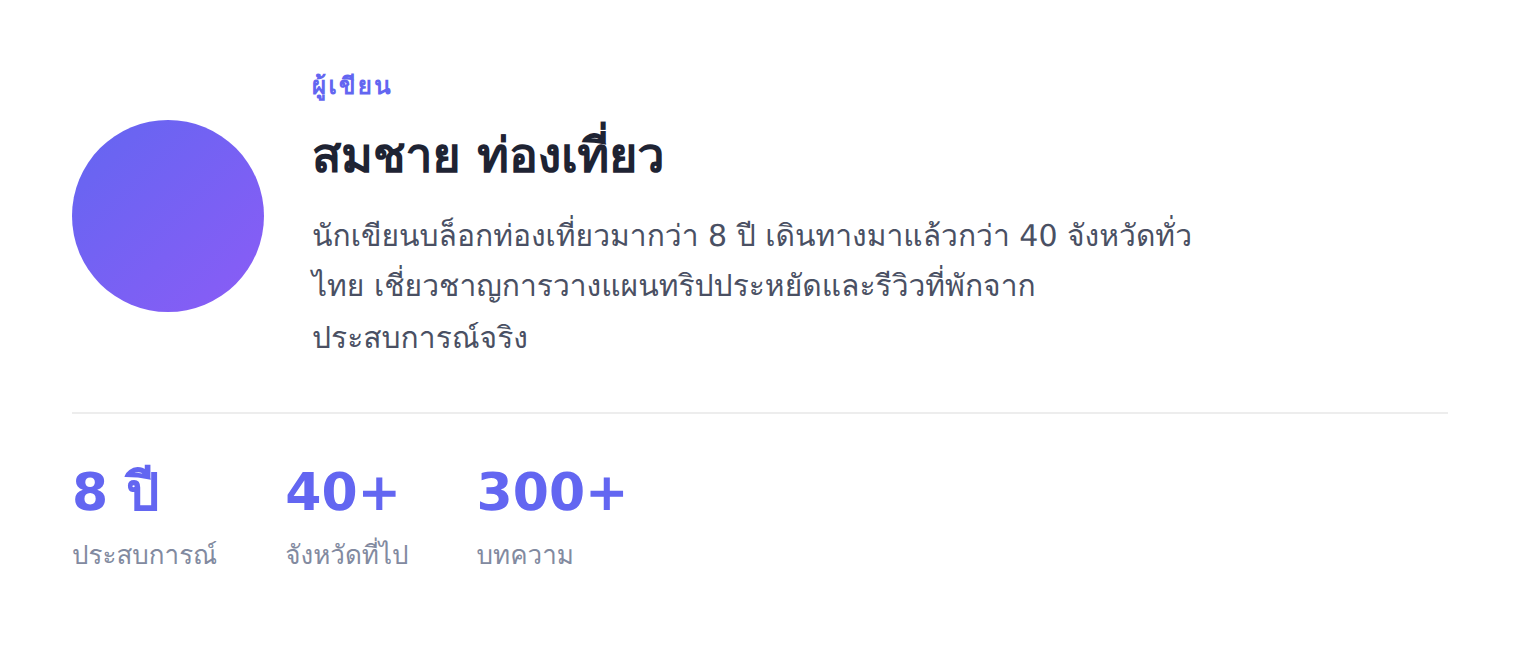
The About/author block is a short introduction to the site or author, placed on the homepage or within an article. It includes a name, a short bio, and a profile image. Unlike a full "About us" page, the About block is a compact section inserted into other pages, introducing you without making readers click away.
The importance of the About block comes from the human nature of wanting to know who you are listening to. When readers see there is a real, experienced person behind the content, they feel more connected and trust it more. Content with no author information at all seems to have floated in from nowhere, while content with a clear author and a relevant bio looks much more credible.
E-E-A-T: why author information matters for SEO
Google uses a framework called E-E-A-T (Experience, Expertise, Authoritativeness, Trustworthiness) to assess content quality, especially topics that affect people's lives or finances. Clear author information stating relevant expertise is one of the signals that helps here.
The About block is therefore where you place information that reinforces the site's E-E-A-T. When you state that the author has experience or expertise relevant to the content, you signal that this content comes from someone who genuinely knows, not copied or shallow writing. That said, the information must be true and relevant. An exaggerated bio does not help and can cost credibility. A sincere, on-point bio is what both readers and Google value.
How to set up the About block, step by step
- Add or select the About block. Select the "About/author" block in the template, or add it into the spot you want, such as the homepage after the post grid.
- Add the name and E-E-A-T bio. Add an eyebrow (such as "Author"), the name/author, and a bio stating experience and expertise relevant to the site's content.
- Add a profile image (and stats/badge). Turn on the profile image and set its URL. In the review/company templates, you can add stats (format: number | description), and the review template supports a verification badge.
- Export the XML and check. Click Export, upload it to Blogger, then check that the About block shows the name, bio, image, and any supporting elements correctly.
Template-specific extras: stats and verification badge
The About block adapts its options by template to reinforce credibility to match the kind of site.
- Stats (review/company templates): add numbers that build credibility, such as "500+ | reviews written" or "10 years | experience", shown as a prominent number with a description, letting readers see credibility concretely.
- Verification badge (review template): add a badge that conveys credibility, such as "Reviews from real use" or "Expert in...", to emphasize the site's stance.
These options let a review or company site's About block communicate credibility on point. Concrete stats and a verification badge reinforce that the content comes from a genuinely experienced source, which matters greatly for content readers use to decide, such as product reviews or company recommendations.
Write a bio that builds credibility
The heart of the About block is a good bio. The principle is to say three things: who you are, what experience or expertise you have relevant to the site's content, and why readers should trust you on this topic. Avoid a bio that is too broad or generic to say anything, such as "loves blogging and sharing knowledge", and focus on the specific and relevant, such as "have written camera reviews for over 5 years and tested more than 100 models".
Specificity and relevance are what genuinely build credibility. A reader deciding to buy a camera trusts a review from someone who tested a hundred models more than a general person, just as Google looks for signals of real experience. A good bio is therefore a worthwhile investment, because it works with both readers and search engines, and used with a full About us page and links in the footer, it reinforces the whole site's credibility further.
The About block vs a full About us page
Many people wonder how the About block differs from an About us page. The answer is that the two complement each other. The About block is a short compact section inserted into the homepage or an article, to introduce yourself at once without making readers click away, while the full About us page is a dedicated page telling the story, origins, and details of the site thoroughly.
Having both is the good approach. The About block builds a quick connection at the point where readers are reading content, while the full About us page serves readers who want to know more and is a strong E-E-A-T signal for Google. When the About block links to the full page, interested readers can click to read on. The two therefore work as a system to build the site's credibility.
Common problems and how to fix them
The profile image does not show
Check that you turned on the profile image option and set a correct image URL. If you do not want an image, turn off the option for a text-only block.
Stats or the badge do not appear
The stats and verification badge options are only in some templates (review/company). If you use another template, these options are absent. Also check the stat format is correct (number | description, one per line).
The bio looks too generic
Make it specific and relevant to the site's content, emphasizing concrete experience or expertise, to build genuine credibility.
How much real information to include
Include real information that builds credibility, but you do not need to reveal unrelated personal details. Focus on what relates to your expertise in the topics you write about.
Best practices
- Write a specific, relevant bio, emphasizing experience/expertise in the topics the site covers.
- Add a real profile image to build a connection with readers.
- Use stats and a verification badge (in templates that support them) to reinforce credibility concretely.
- Always give real information. Avoid exaggeration that can cost credibility.
- Use it with a full About us page and links in the footer, for strong E-E-A-T.
Wrapping up
The About/author block is a key element for building the site's credibility, because it answers the question both readers and Google want to know: who is behind the content. With BlogKub, you set up the About block fully with no coding, including the eyebrow, name, E-E-A-T bio, profile image, and in some templates stats and a verification badge. When you write a specific, sincere bio relevant to the content, the About block builds a connection with readers and sends credibility signals good for SEO. Used with a full About us page, your site has a strong E-E-A-T foundation, which matters more and more for making a site successful.
Frequently asked questions (FAQ)
What is the About block?
It is a short introduction to the site or author, with an eyebrow, name, bio, and profile image, telling readers who is behind the content, building connection and credibility. Unlike a full About page, it is a short block placed on the homepage or within an article.
How does E-E-A-T relate?
E-E-A-T (Experience, Expertise, Authoritativeness, Trust) is a framework Google uses to assess content quality. Having author information that states experience and expertise sends these signals, so the About block is where you place a bio that reinforces the site's E-E-A-T.
Can I add stats or a verification badge?
Yes, in some templates. The review and company templates support stats (such as number of articles or followers), and the review template supports a verification badge, to reinforce credibility to match the kind of site.
How should I write the bio?
Write it to say who you are, what experience or expertise you have relevant to the site's content, and why readers should trust you. Be concise but substantial. Avoid overly broad information, focusing on what builds credibility in the topics you write about.
Where should the About block go?
Commonly on the homepage (such as after the post grid) to introduce yourself to new readers, or within an article to say who wrote it. Both build connection and reinforce the content's credibility.