
How to add a magazine-style dropcap in Blogger articles
A dropcap is a classic layout flourish from the world of magazines and books that makes the first letter of an article large and striking. This article teaches you how to add a dropcap to a Blogger theme with BlogKub, one that picks the real first paragraph automatically and lets you adjust the color, along with the design reasoning and how to fix problems.
Quick summary: add the Large first letter (Dropcap) block in BlogKub, choose the color as an accent color or the normal text color, then Export the XML and upload it to Blogger. The system makes the first letter of the first content paragraph larger in a magazine style automatically, picking the correct paragraph by skipping images, summary boxes, and the table of contents.
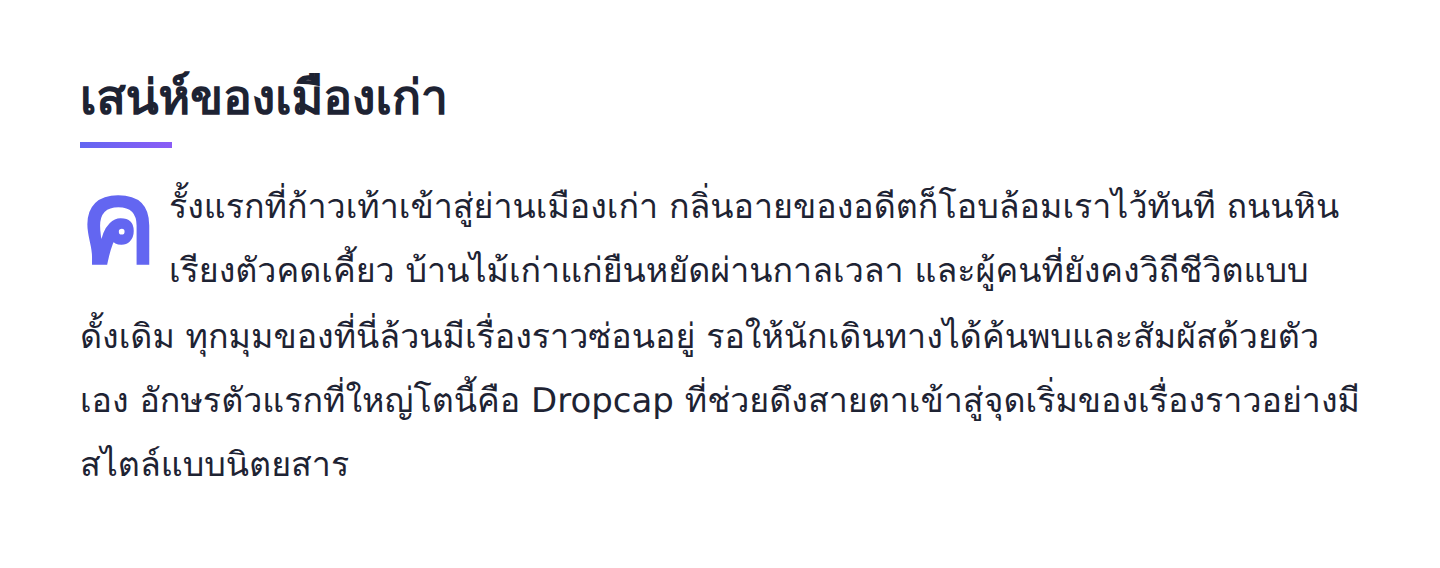
What a dropcap is, and where it comes from
A dropcap is the first letter of a paragraph enlarged several times and spanning several lines downward. It is a layout technique that dates back to the era of illuminated manuscripts and carried through to quality magazines, books, and newspapers. Its original purpose was to draw the reader's eye to say "start reading here" and to give the page a refined feel.
In the modern web, the dropcap keeps that same value. It turns an ordinary opening paragraph into a distinctive start, making an article look like deliberate writing rather than just text placed in a row. For a blog that wants to project a magazine image or a premium lifestyle feel, the dropcap is a small detail that clearly raises the overall impression.
Why "automatic" paragraph selection matters
The real challenge of a dropcap on the web is not making the letter large, it is picking the correct paragraph. Simple dropcap methods using CSS alone (such as :first-of-type) often miss, because a real Blogger article does not always start with a text paragraph. Often the first paragraph is an image, a summary box, or a table of contents, which makes the dropcap land in the wrong place or not appear at all.
BlogKub solves this with a small script that searches for the first content paragraph that is real text, skipping image-only paragraphs, skipping AEO summary boxes, and skipping the table of contents, then adds the dropcap class to that paragraph. The result is that the large first letter always lands on real text, whatever the article's opening structure, so you never have to fix it article by article.
How to add the dropcap in BlogKub, step by step
- Add the Dropcap block. Open the left block library, the "Article & UX" category, and drag the "Large first letter" block into the page to enable it across the whole theme.
- Choose the letter color. In the block settings, choose "Accent" to make the first letter use the theme's main color for prominence, or "Normal text color" for an understated, blended look.
- Export the XML and upload. Click Export, then take the file to blogger.com → Theme → three-dot menu → Backup/Restore → select the XML file.
- Check the first paragraph. Open a real article to confirm the first letter of the first content paragraph is enlarged nicely and does not land on an image or a summary box.
Which color to choose: accent vs normal text color
Choosing the dropcap color affects the mood of the article more than you might think. The two options suit different situations.
- Accent: the first letter uses the theme's main color, making the start of the article prominent and lively. It suits lifestyle, travel, or any site that wants brightness and wants the dropcap to be an eye-catching spot of color.
- Normal text color: the first letter is enlarged but uses the same color as the content, giving a classic, refined, formal feel. It suits academic blogs, company sites, or content that wants a composed tone.
A simple recommendation: if your site has a clear brand color and you want to reinforce your identity, choose the accent. But if you emphasize easy reading and formality, the normal text color blends better. Try both in a real article and choose the one that best fits your site's overall look.
The dropcap and Thai: things to watch
The dropcap was designed from Latin letters, which have consistent height. Applied to Thai, there are extra considerations, because many Thai consonants have upper vowels, lower vowels, or tone marks that take up vertical space. When you enlarge the first letter, these elements grow too and may crowd the neighboring lines.
In practice, BlogKub's dropcap works with Thai and automatically scales smaller on mobile screens to reduce crowding, but we recommend checking the opening paragraph of Thai articles after setup, especially if the first letter is a consonant with a vowel or tone mark attached. If it feels too tight, starting the first paragraph with a consonant of a simpler shape helps the dropcap look nicer.
The dropcap, reading, and good design
A dropcap is not just decoration, it plays a role in visual hierarchy. It quietly tells the reader that the content starts here, and creates a gentler entry into the article than jumping straight into the text. Used in moderation, the dropcap makes the article page look deliberately laid out and professional.
That said, the key is moderation. A dropcap suits "a single opening paragraph" of an article, and should not be added to every paragraph, which would look cluttered. BlogKub is therefore designed to apply it only to the first content paragraph, to preserve the elegance of the technique and let it draw the eye to the start without stealing attention from the rest of the content.
When you pair the dropcap with other reading elements, such as dark mode, which helps reading in low light, and a progress bar, which shows how far along you are, your article becomes both beautiful and easy to read at once.
Examples of using the dropcap in different kinds of blogs
The dropcap fits certain content types especially well. Look at these examples to picture how to use it aptly.
- Story/essay blogs: the dropcap fits descriptive writing beautifully, because it creates a literary atmosphere from the very first line.
- Lifestyle and fashion blogs: the magazine tone of the dropcap reinforces a premium image well, especially when you choose an accent color to match your brand color.
- Travel blogs: an opening paragraph describing a destination becomes more inviting when a large first letter leads the eye.
- Academic or analytical blogs: choose the normal text color for formality, and the dropcap adds refinement without looking too playful.
Notice the dropcap suits content that has a clear "text opening paragraph". If your articles often start with a large image first, BlogKub's automatic paragraph selection still ensures the dropcap lands on the first text paragraph correctly.
Common problems and how to fix them
The dropcap does not appear
Check that you added the Dropcap block and Exported again. If an article has no real text paragraph at all (for example only images or a list), the system has no paragraph to apply the dropcap to. Make sure the article has at least one content paragraph.
The dropcap lands on a summary box or the table of contents
Normally the system skips these elements. If you still see the problem, check that the summary box or table of contents was added via a real BlogKub block, not a structure you laid out yourself that the system does not recognize.
The Thai first letter looks crowded with its vowel or tone mark
This is natural for Thai when a letter is enlarged. Try checking the display on mobile, where the system already reduces the size, or adjust the opening paragraph to start with a consonant of a simpler shape for a better look.
You want to turn the dropcap off for certain articles
The dropcap is a theme-level setting that applies to the first paragraph of every article. If you need per-article control, plan your article openings to be consistent, or consider which article types should have a dropcap from the start.
Best practices
- Use the dropcap to reinforce a magazine image, not everywhere, and choose a color that fits your site's overall tone.
- Check the opening paragraph of Thai articles after setup, especially when the first letter has a vowel or tone mark.
- Test the display on both desktop and mobile, since the dropcap size scales with the screen.
- Pair it with other reading elements such as a table of contents and related articles so it is both beautiful and easy to use.
Wrapping up
The dropcap is a small design detail that gives your articles a premium, magazine feel from the very first line. BlogKub's strength is picking the real first content paragraph automatically, skipping images, summary boxes, and the table of contents, so the dropcap always lands in the right place without you fixing it article by article. Just add the block, choose an accent or normal color, and Export it, and every article gets an elegant, distinctive start that raises your site's image to look deliberate and professional.
Frequently asked questions (FAQ)
What is a dropcap?
A dropcap is the first letter of a paragraph made several times larger, spanning multiple lines. It is a classic layout technique from magazines and books, used to draw the eye to the start of the content and add style to an article.
Which paragraph does the dropcap land on in BlogKub?
The system picks the real first content paragraph automatically, skipping image-only paragraphs, AEO summary boxes, and the table of contents, so the large first letter always lands on real text, not another element.
Can I change the dropcap color?
Yes. You can choose between an accent color that uses the theme's main color for prominence, or the normal text color for an understated look. You set it in the block settings in BlogKub.
Does the dropcap work with Thai?
It works. The first letter of the paragraph is enlarged whether it is a Thai or Latin character. That said, Thai consonants with vowels or tone marks may need a little extra spacing, so check the first paragraph looks good after setup.
Does the dropcap affect SEO or speed?
No. The dropcap is mainly CSS styling plus a small script that runs on the reader's side. It loads no external files and does not change the content, so the text remains fully readable for search engines.